
Map the house
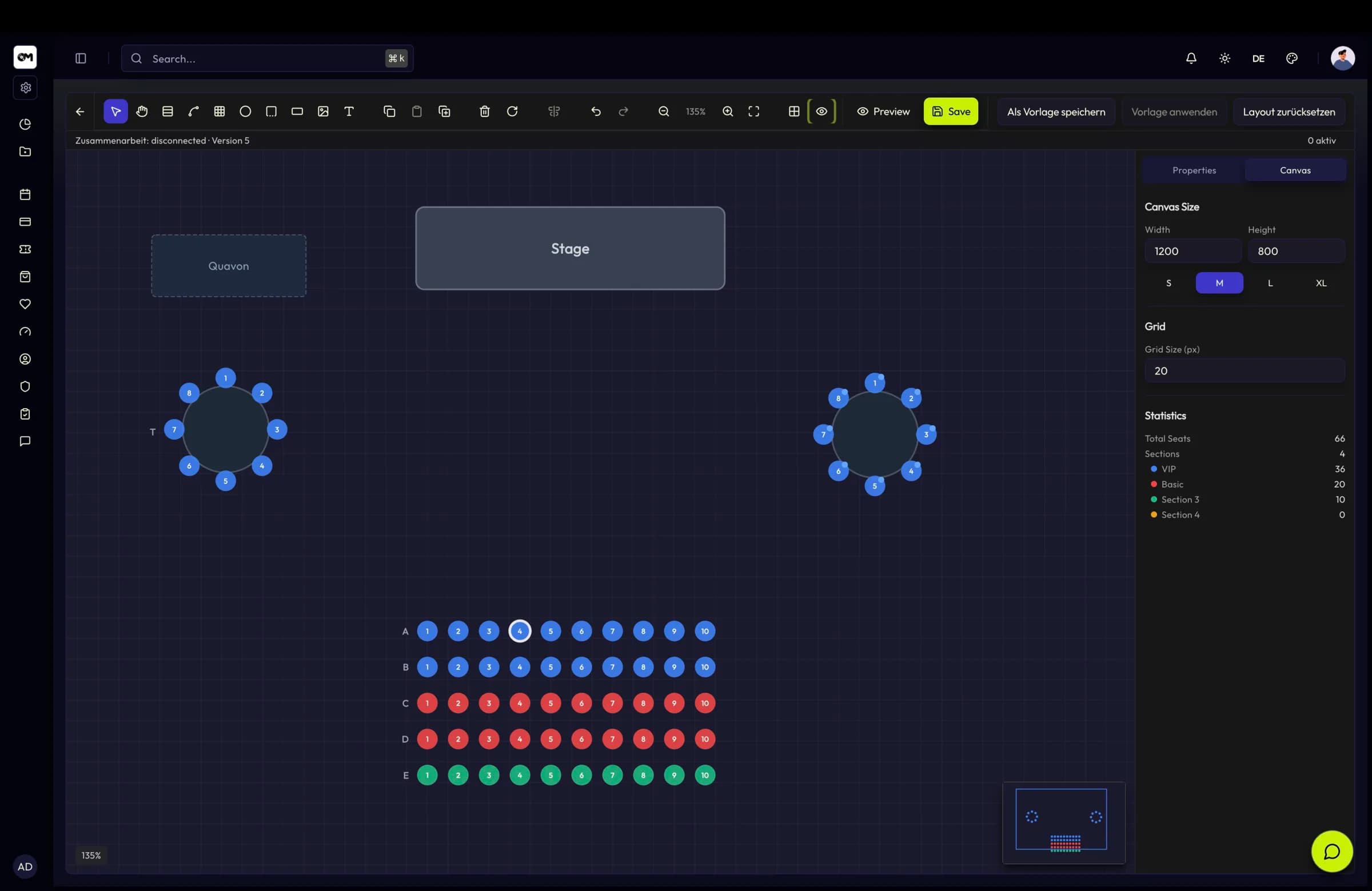
Lay out sections, rows, boxes and balconies, and save the layout as a reusable template.
Theatre & performing arts
Rows, boxes and balconies mapped as they really are — plus subscriptions that renew themselves and a repertory schedule that plans as a series.
In short
In a theatre the seat is the product. TixFin lets you map the house exactly — rows, boxes and balconies in 2D, or the real building as a 3D model with seats on a Z axis — and sells those places through a hold-release-confirm reservation flow that cannot double-sell. Season subscriptions are ticket types flagged as memberships, with a duration in months, an optional grace period, auto-renewal and lifetime tiers, and recurring performances are planned as a series through upcoming-event views rather than as unrelated one-offs.
Seatmap editor
Seatmaps support reusable templates, and the editor is collaborative: live presence, visible cursors and selections, element locking for parallel work, and conflict feedback when someone saved in the meantime. Drafts and templates stay internal — public routes serve only published maps.
Capabilities
Sections, rows, boxes and balconies laid out in the seatmap editor, reusable as templates across a season.
Seats are held, released and confirmed as a distinct flow, with server-side ownership checks so a place cannot be sold twice.
Membership ticket types with a term in months, optional grace period, auto-renewal, renewal reminders and lifetime tiers.
Upcoming-event views make recurring performances plannable as a series instead of forcing a copy per date.
Points per purchase and per check-in, tiers with multipliers, and rewards such as upgrades or early access redeemed for voucher codes.
Accessibility, directions and house rules maintained per project in German and English with their own meta fields.
Challenges
Restricted views, boxes and balcony rows all price differently. The plan has to say which is which before the buyer pays.
A subscription is a relationship with a term, a renewal and benefits — not a batch of separate ticket sales.
A run of performances shares a setup but needs its own dates, capacity and box office.
Workflow
Lay out sections, rows, boxes and balconies, and save the layout as a reusable template.
Flag subscription ticket types as memberships, set the term, grace period and tier benefits.
Create the performances as a recurring series with their own dates and inventory.
Take payment, deliver wallet tickets and credit loyalty points at every check-in.
Key facts
Features
2D and 3D venues, a collaborative seatmap editor with live presence and element locking, reusable templates and a clean reservation flow.
Ticket types that act as memberships, with duration, grace period, auto-renewal, lifetime tiers, member numbers and POS renewal.
Ticket types, dynamic pricing phases, add-ons, bundles, buyer questions and a checkout that works for guests and registered buyers alike.
Points per euro, check-in points, streak bonuses, tiers with multipliers, a reward catalogue with voucher codes and a personal member dashboard.
FAQ